Services · Anywhere in the US
Everything your business needs online.
Your site, your listings and your leads, looked after by one person you can reach directly. Below is every piece I set up and check, all 21 of them.
Pick yours. The list below follows.
Everything I set up and check
Each one in your own account, set up with you, and looked at again after it is live.
The foundation
For every business.
9What I set upBuilt for phones, with a page for each service and search data that tells Google, Bing and ChatGPT what your business is.
What I checkEvery page answers, your forms reach your inbox and the speed holds.
Your domain
A web address customers trust.
What I set upIn your own account. You add me so I can connect it to your site.
What I checkThe renewal date, and that your mail records haven't changed.
Email from your site
Orders and questions from your site land in your inbox.
What I set upYour request form, and the records that let your site send mail in your domain's name.
What I checkThe mail records are still in place.

Google Search Console
Gets your pages into Google, and shows the exact words people search to find you.
What I set upYour domain verified with a DNS record and your list of pages submitted.
What I checkYour pages are in Google, any new errors, and that the list is still being read.

Bing Webmaster Tools
Being found on Bing, which Microsoft Copilot uses for its answers and ChatGPT search draws on.
What I set upBrought in from Search Console, your list of pages submitted, your site open to Bing's crawler.
What I checkYour pages are in Bing, and any new errors.
Visitor stats
Proof of what's working: visits, where they came from, taps on Call or Order.
What I set upCounting on your site from day one, shown in your dashboard.
What I checkVisits are still being counted.
What I set upA check every 5 minutes, errors recorded, and a warning 30 days before your domain renews.
What I checkThe last check came back up, and any open errors.

Facebook page
People who check Facebook before they buy, and one more place with matching details.
What I set upYour page's name, phone, hours and website matching your site.
What I checkThe page is live and still matches.
Where people nearby find you
For a business that meets its customers in person: a place they visit, or you go to them.
8Google Business Profile
The biggest one: you in Google Maps and in the map box when people nearby search, with your calls, directions and reviews.
How I set it upWhat I set upCategories matched to the businesses that show up first near you, every true service, real and holiday hours, photos and a tagged website link.
What I checkStill verified and live, your details match, new reviews to answer and any edits waiting.
Google reviews
More reviews and good ratings help you win the call. Most people care most about the last three months.
What I set upYour review link and QR code, and one short message to send after every job.
What I checkNew reviews since last time, with a reply drafted for each.

Apple Maps
iPhone users see your place card in Apple Maps, Siri, Spotlight and Safari.
How I set it upWhat I set upYour place card claimed and verified, matching Google.
What I checkThe card is live and still matches.
Bing Places
Bing Maps, and answers about nearby businesses in Microsoft Copilot, which runs on Bing.
How I set it upWhat I set upImported from your verified Google profile, then kept in step with it.
What I checkIt is still in step with Google.

Yelp
People check it before they go, and ChatGPT leans on Yelp for answers about nearby businesses.
How I set it upWhat I set upClaimed and complete: categories, hours, photos and your website.
What I checkThe page is live and matches, and any new reviews.
What I set upYour business page, with your address hidden if you work from home.
What I checkThe page is live and still matches.
Foursquare
Keeps your details right in apps that read Foursquare's place data.
What I set upYour place claimed, with the same name, address, phone and hours.
What I checkThe listing is live and still matches.
Your trade's directory
Customers who look in your trade's own directory, such as the BBB or Angi.
What I set upOne, picked with you: the profile claimed and matching.
What I checkThe profile is live and still matches.
For a shop that ships
For a business that sells online.
4What I set upA product feed from your store with prices, stock and shipping, kept in sync.
What I checkYour products are approved and nothing sits disapproved.
Google Customer Reviews
Star ratings from real buyers on Google Shopping.
What I set upThe short survey Google sends buyers who opt in at checkout, added to your order page.
What I checkThe survey still shows after checkout.

Pinterest
People searching for gift and idea pictures. Every pin links back to your shop.
What I set upYour site verified with Pinterest, and your pins linking to your products.
What I checkYour site is still verified and the pins still link.
Your logo in Apple MailOptional
Your name and logo beside your emails, for customers on an iPhone.
What I set upYour brand added to your Apple Business account.
What I checkThe brand is still approved.
Logos and names belong to their owners. Jade Digital Labs is not affiliated with or endorsed by them.
One plan covers it.
A one-time setup fee, then a flat monthly price
A one-time setup fee, then a flat monthly price, both written in your proposal. Nothing is charged until you approve it.
See pricingTo start
- Your website, built with a private preview and changes until it feels right
- Your own dashboard: follow your build from day one, then see your site's uptime and visitors once it's live
- Your domain connected: the one you have, or a new one you buy with my simple steps
- Your request form and email sending set up
Every month
- Your website: hosted, fast on phones, tap to call and a request form
- Your business on Google, Apple Maps, Bing, Yelp and more, set up and kept matching
- Every lead sent to you right away and saved in your dashboard
- Kept safe: security updates, a site check every 5 minutes, errors caught and spam blocked
- Changes when you ask: text, photos, prices, hours and new pages, each approved by you before it goes live
- One report a month: visits, calls, leads and what I fixed
- You own everything: month to month, 30 days' notice, and you leave with all of it
Something bigger? I'll quote it first.
Apps
Your own app on the App Store and Google Play.
Ask for a quoteOnline stores
Sell online, with card checkout through Stripe.
Ask for a quoteCustom features
Booking, a members' area, or a tool your business runs on.
Ask for a quote
Every client's dashboard
Your business, in one login.
Hire me and you get your own dashboard. Try this sample one, set up for a made-up flower shop.
- Ask for a change, watch it get doneText, photos, prices, hours or a new page: Received, In progress, Done.
- Every lead, savedEach form your site sends lands here too: New, Replied, Booked or Not a fit.
- Your site, watchedChecked every 5 minutes, with its uptime and your domain's renewal date.
- Messages and your planTalk to me and see what your plan includes, all in one place.
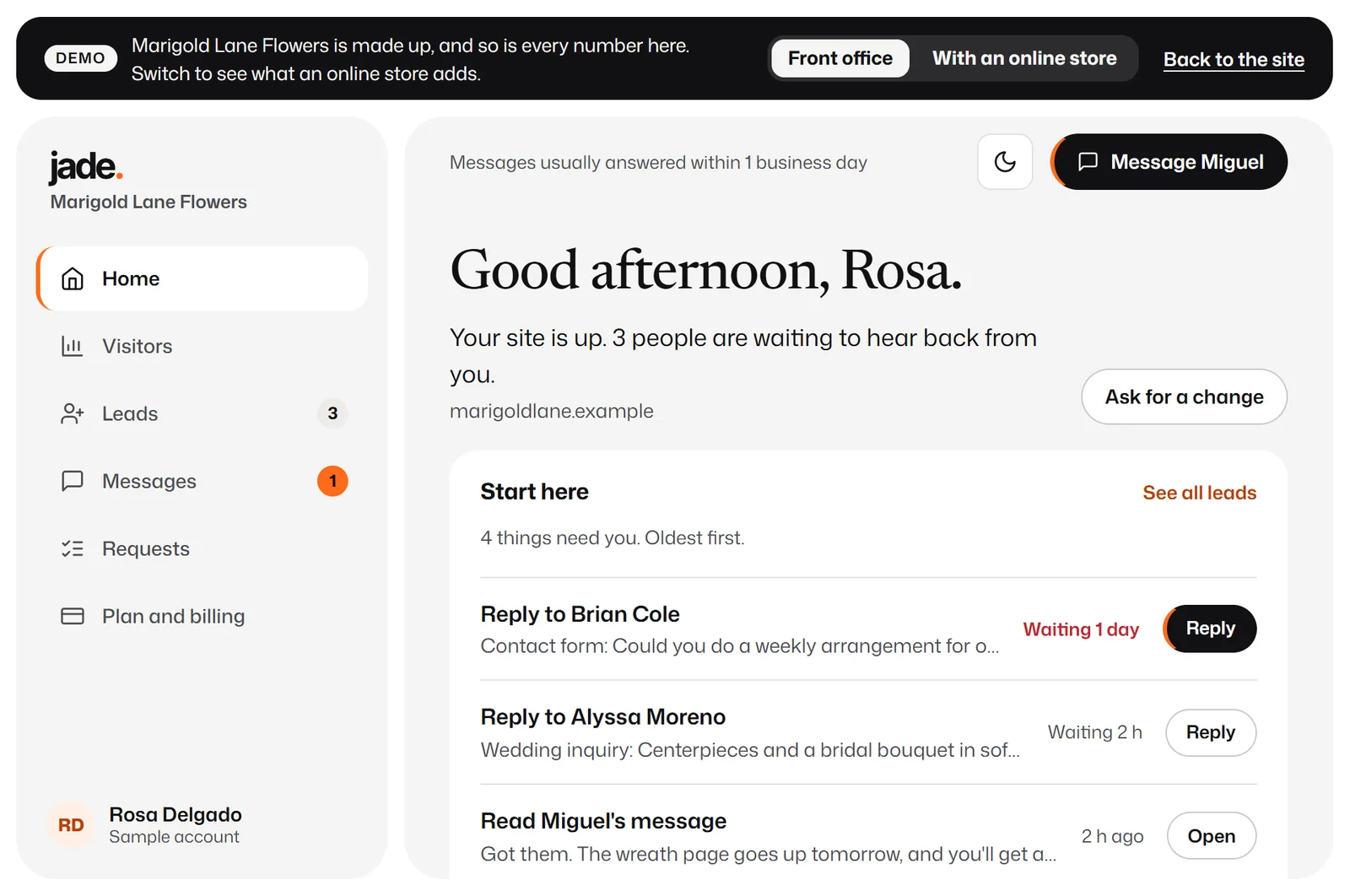
A sample dashboard for a made-up flower shop. Nothing is sent.
From a free check to a business that's easy to find.
Step 1: Free site check
Send me your business name and current website. I'll check how you show up on Google and on phones, and send you a short report: what's working, what isn't and what I'd fix first.
Step 2: A private preview
I build your new site on a private link. Click through it on your own phone and tell me what to change.
Step 3: Launch
When you approve it, I switch your web address over. Your email keeps working, and your old site stays up until the new one is live.
Step 4: I keep it running
Hosting, updates, security and changes for a flat monthly price. Need a change? Sign in to your dashboard and ask for it, or message me.
Questions owners ask.
Anything else? Email me at miguel@jadedigitallabs.com.
How long does it take?
Most sites take 1 to 3 weeks, and online stores take 4 to 6.
What does it cost?
A one-time setup fee, then a flat monthly price, both set for your business. Your proposal shows the exact price and everything that's included, in writing, and nothing is charged until you approve it.
How do I pay?
The setup fee when you approve your proposal. Then the monthly price, starting one month later on the same date, while I build your site and after it's live.
Who owns my site?
You do. Your domain and your listings stay in your own accounts, in your name: you add me as a manager, and if you ever leave, you remove me and keep them all. I also hand over your whole site: the full source code, the design and all your content. If your proposal includes an early hand-over fee, it applies only if you ask to cancel within two months of your payment day.
Can I cancel my plan?
Yes. The plan is month to month. Give me 30 days' notice and I'll hand over your whole site. If your proposal includes an early hand-over fee, it applies only if you ask to cancel within two months of your payment day.
Do you need my passwords?
No. You add me as a manager with my own login on your domain, your Google listing and the other accounts that allow it, and you can remove me any time. If you don't have an account yet, I send you simple steps to make it in your own name.
Do you write the words?
Yes. I write them from what you tell me, and you approve every page. Logos and photography are quoted separately.
What about changes after launch?
Ask whenever you need something. Changes and new pages are part of the plan. If a request grows into a bigger project, like an app or a new feature, I'll quote it first and you decide.
Free site check
Your next chapter, built online.
Tell me about your business. I'll check your current site and how you show up on Google, then reply by email.